Proxying Python Requests
Introduction
Proxying is very useful when conducting intensive web crawling/scrapping or when you just want to hide your identity (anomization).
A convenient way to implement HTTP requests is using Pythons requests library. One of requests most popular features is simple proxying support. HTTP as a protocol has very well-defined semantics for dealing with proxies, and this contributed to the widespread deployment of HTTP proxies.
In this post I am using public proxies to randomise http requests over a number of IP addresses and using a variety of known user agent headers these requests look to have been produced by different applications and operating systems. The whole project is located on github.
TinyProxy Installation
If you wanted to use your own proxy, to avoid high delays from public proxy providers, you could install tinyproxy.
For this purpose we could also use a free EC2 instance. Just remember to enable the needed ports in the security settings.
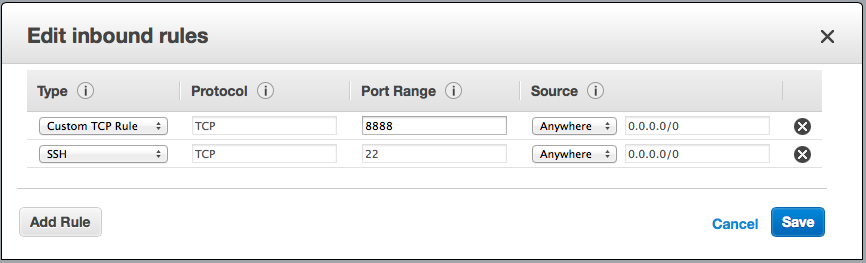
Installing tinyproxy is pretty straightforward, at least on Ubuntu. To install just type: apt-get install tinyproxy
Then configure the security settings: nano /etc/tinyproxy.conf
In the tinyproxy.conf file configure the port number (default 8888). TinyProxy does not provide authentication, it is using an allow list instead. So before closing the configuration file make sure your IP address is in the Allow list. Visit www.whatismyip.com to find your IP address. Assuming your IP address was 123.123.123.123 the line should be: Allow 123.123.123.123
You can then start to use your proxy server. To change the IP address of the EC2 instance and consequently the proxy server, simply click STOP on the server and then start it again.
Getting Started
The python code below is crawling two different public proxy websites http://proxyfor.eu/geo.php and http://free-proxy-list.net. After collecting the proxy data and filtering the slowest ones it is randomly selecting one of them to query the target url. The request timeout is configured at 30 seconds and if the proxy fails to return a response it is deleted from the application proxy list.
1
2
3
4
5
6
7
8
9
10
11
12
13
14
15
16
17
18
19
20
21
22
__author__ = 'pgaref'

import requests
from requests.exceptions import ConnectionError
import random
import os
import time
from bs4 import BeautifulSoup
from requests.exceptions import ReadTimeout

class RequestProxy:
    agent_file = 'user_agents.txt'

    def __init__(self, web_proxy_list=["http://54.207.114.172:3333"]):
        self.useragents = self.load_user_agents(RequestProxy.agent_file)
        #####
        # Proxy format:
        # http://<USERNAME>:<PASSWORD>@<IP-ADDR>:<PORT>
        #####
        self.proxy_list = web_proxy_list
        self.proxy_list += self.proxyForEU_url_parser('http://proxyfor.eu/geo.php', 100.0)
        self.proxy_list += self.freeProxy_url_parser('http://free-proxy-list.net')
Generate Random User Agent Header
I have to mention that for each request a different agent header is used. This headers are strong in the /data/user_agents.txt file which contains around 900 different agents.
1
2
3
4
5
6
7
8
9
10
11
12
13
14
15
16
17
18
19
20
21
22
23
24
25
26
27
28
    # load agents from file
    def load_user_agents(self, useragentsfile):
        """
        useragentfile : string
            path to text file of user agents, one per line
        """
        useragents = []
        with open(useragentsfile, 'rb') as uaf:
            for ua in uaf.readlines():
                if ua:
                    useragents.append(ua.strip()[1:-1-1])
        random.shuffle(useragents)
        return useragents

    def get_random_user_agent(self):
        """
        useragents : string array of different user agents
        :param useragents:
        :return random agent:
        """
        user_agent = random.choice(self.useragents)
        return user_agent

    def generate_random_request_headers(self):
        headers = {
        "Connection" : "close",  # another way to cover tracks
        "User-Agent" : self.get_random_user_agent()}  # select a random user agent
        return headers
Parse & Filter Public Proxies
1
2
3
4
5
6
7
8
9
10
11
12
13
14
15
16
17
18
19
20
21
22
23
24
25
26
27
28
29
30
31
32
33
34
35
36
37
38
39
40
41
42
43
44
45
46
47
48
49
50
51
52
53
54
55
56
57
58
59
60
61
    # parse proxy data from url link
    def proxyForEU_url_parser(self, web_url, speed_in_KBs=100.0):
        curr_proxy_list = []
        content = requests.get(web_url).content
        soup = BeautifulSoup(content, "html.parser")
        table = soup.find("table", attrs={"class": "proxy_list"})

        # The first tr contains the field names.
        headings = [th.get_text() for th in table.find("tr").find_all("th")]

        datasets = []
        for row in table.find_all("tr")[1:]:
            dataset = zip(headings, (td.get_text() for td in row.find_all("td")))
            datasets.append(dataset)

        for dataset in datasets:
            # Check Field[0] for tags and field[1] for values!
            proxy = "http://"
            proxy_straggler  = False
            for field in dataset:
                # Discard slow proxies! Speed is in KB/s
                if field[0] == 'Speed':
                    if float(field[1]) < speed_in_KBs:
                        proxy_straggler = True
                if field[0] == 'IP':
                    proxy = proxy+field[1]+':'
                elif field[0] == 'Port':
                    proxy = proxy+field[1]
            # Avoid Straggler proxies
            if not proxy_straggler:
                curr_proxy_list.append(proxy.__str__())
            #print "{0:<10}: {1}".format(field[0], field[1])
        #print "ALL: ", curr_proxy_list
        return curr_proxy_list

    def freeProxy_url_parser(self, web_url):
        curr_proxy_list = []
        content = requests.get(web_url).content
        soup = BeautifulSoup(content, "html.parser")
        table = soup.find("table", attrs={"class": "display fpltable"})

        # The first tr contains the field names.
        headings = [th.get_text() for th in table.find("tr").find_all("th")]

        datasets = []
        for row in table.find_all("tr")[1:]:
            dataset = zip(headings, (td.get_text() for td in row.find_all("td")))
            datasets.append(dataset)

        for dataset in datasets:
            # Check Field[0] for tags and field[1] for values!
            proxy = "http://"
            for field in dataset:
                if field[0] == 'IP Address':
                    proxy = proxy+field[1]+':'
                elif field[0] == 'Port':
                    proxy = proxy+field[1]
            curr_proxy_list.append(proxy.__str__())
            #print "{0:<10}: {1}".format(field[0], field[1])
        #print "ALL: ", curr_proxy_list
        return curr_proxy_list
Use Request Proxy
1
2
3
4
5
6
7
8
9
10
11
12
13
14
15
16
17
18
19
20
21
22
    # generate a randomised request to the specific url given as argument
    def generate_proxied_request(self, url, params={}, req_timeout=30):
        if len(self.proxy_list) < 2:
            self.proxy_list += self.proxyForEU_url_parser('http://proxyfor.eu/geo.php')

        random.shuffle(self.proxy_list)
        req_headers = dict(params.items() + self.generate_random_request_headers().items())

        request = None
        try:
            rand_proxy = random.choice(self.proxy_list)
            request = requests.get(test_url, proxies={"http": rand_proxy},
                                   headers=req_headers, timeout=req_timeout)
        except ConnectionError:
            self.proxy_list.remove(rand_proxy)
            print "Proxy unreachable - Removed Straggling proxy :", rand_proxy, " PL Size = ",len(self.proxy_list)
            pass
        except ReadTimeout:
            self.proxy_list.remove(rand_proxy)
            print "Read timed out - Removed Straggling proxy :", rand_proxy, " PL Size = ", len(self.proxy_list)
            pass
        return request
Connecting the pieces together
1
2
3
4
5
6
7
8
9
10
11
12
13
14
15
16
17
18
19
20
21
22
# Main method to test functionality - generating request to a local service
if __name__ == '__main__':

    start = time.time()
    req_proxy = RequestProxy()
    print "Initialisation took: ", (time.time()-start)
    print "Size : ", len(req_proxy.get_proxy_list())
    print " ALL = ", req_proxy.get_proxy_list()

    test_url = 'http://localhost:8888'


    while 1:
        print "here"

        start = time.time()
        request = req_proxy.generate_proxied_request(test_url)
        print "Proxied Request Took: ", (time.time()-start), " => Status: ", request.__str__()
        print "Proxy List Size: ", len(req_proxy.get_proxy_list())

        print"-> Going to sleep.."
        time.sleep(10)
##References
- TinyProxy documentation and the TinyProxy repository
- Will Drevo, “Using a proxy with a randomized user agent in Python requests” (original post no longer online)
- Github Project Link